Back to models
GPT Image 2.6 Flare · our test (1K medium, about 10 s)

GPT Image 2.6 API

OpenAI · GPT ImageImage modelOperational

GPT Image 2.6 API (Flare, the fast model) turns text into images, edits from references, masks or markup, and also makes animated GIFs. 1K to 4K, billed per token.

Pricing

1K · medium, one image

20% off
$0.035$0.044/ image (approx.)

Price cut (from November 7, 2026): GPT Image 2.5 and 2.6 per token are now 20% under OpenAI's list price: $4.00 text input, $6.40 image input and $24.00 output per 1M tokens (was $4.40 / $7.04 / $26.40).

Variant

Input

70 / 32000
Aspect ratio
Resolution

More parameters

Generation settings

Quality
Complexity
Background
Output format
Estimated cost≈$0.035 / image20% offVendor list price ≈ $0.044Estimate only. Quality unset or auto counts as medium, and the model picks the quality itself when it is omitted. A slightly higher amount is reserved, then settled by the actual tokens.
$1 buys≈ 28 images

Output

Run to see the result here

Result links are signed and kept for 24 hours — download anything you want to keep. Failed tasks are refunded in full.

Know the cost before you top up

What one GPT Image 2.6 Flare image costs

Billed per token, so the price of an image depends on its size and quality. Bold prices are from our own tests; prices marked ≈ use the token counts of OpenAI's calculator. Balances and charges are in USD; Alipay payments convert to CNY at the rate when you order.

Your first test

1K · medium · text-to-image

$0.035$0.044/ image

An estimate is held when you submit, then the charge settles on the tokens actually used and the difference comes back. Without quality the model picks the level and medium is held. A failed task is refunded in full.

Images per top-up (at 1K medium above)

$10Settle the composition at 1K low, then render at medium
about 286
$50A batch of product shots or social images
about 1,434
$100A small rollout inside your product
about 2,868

From $5 · the balance never expires

Top up →

Common costs

Cheapest test

1K · low

$0.020$0.025

Measured: 824 output tokens

A standard image

1K · medium

$0.035$0.044

Measured: 1,449 output tokens

Edit with one reference

1K · medium + 1 reference

$0.042$0.052

A reference adds about 1,100 image input tokens

A 4K image

4K · medium

$0.118$0.147

≈ OpenAI's calculator; an experimental size per OpenAI

Quality \ size1K2K4K
low$0.020$0.025≈ $0.040$0.050≈ $0.067$0.083
medium$0.035$0.044≈ $0.071$0.088≈ $0.118$0.147
high≈ $0.042$0.053≈ $0.086$0.107≈ $0.142$0.178
xhigh≈ $0.075$0.094≈ $0.152$0.190≈ $0.253$0.316
max≈ $0.169$0.211≈ $0.343$0.428≈ $0.569$0.712

Per 1M tokens: text input $4.00, image input $6.40, output $24.00 (OpenAI: $5 / $8 / $30; struck-through prices are OpenAI's). An image costs its prompt, reference and output tokens. The table shows square images at 1024², 2048² and 2880²; other shapes usually cost less. OpenAI marks sizes above 2560×1440 as experimental. Cached tokens bill at the full rate.

About GPT Image 2.6 Flare

GPT Image 2.6 API: fast images and edits, billed per token

Flare is the fast GPT Image 2.6 model. OpenAI says Images 2.6 generates 50% faster than before and that Flare at low quality can take as little as six seconds; a 1K medium image took about 10 seconds in our test. Sunburst, at the same price, is the one for greater detail and consistency across edits.

What the GPT Image 2.6 API can do

GPT Image 2.6 prompt examples

Each capability has a sample labelled as our own test or an OpenAI example; limits are in the parameter cards below.

low · 824 tokens
medium · 1,449 tokens

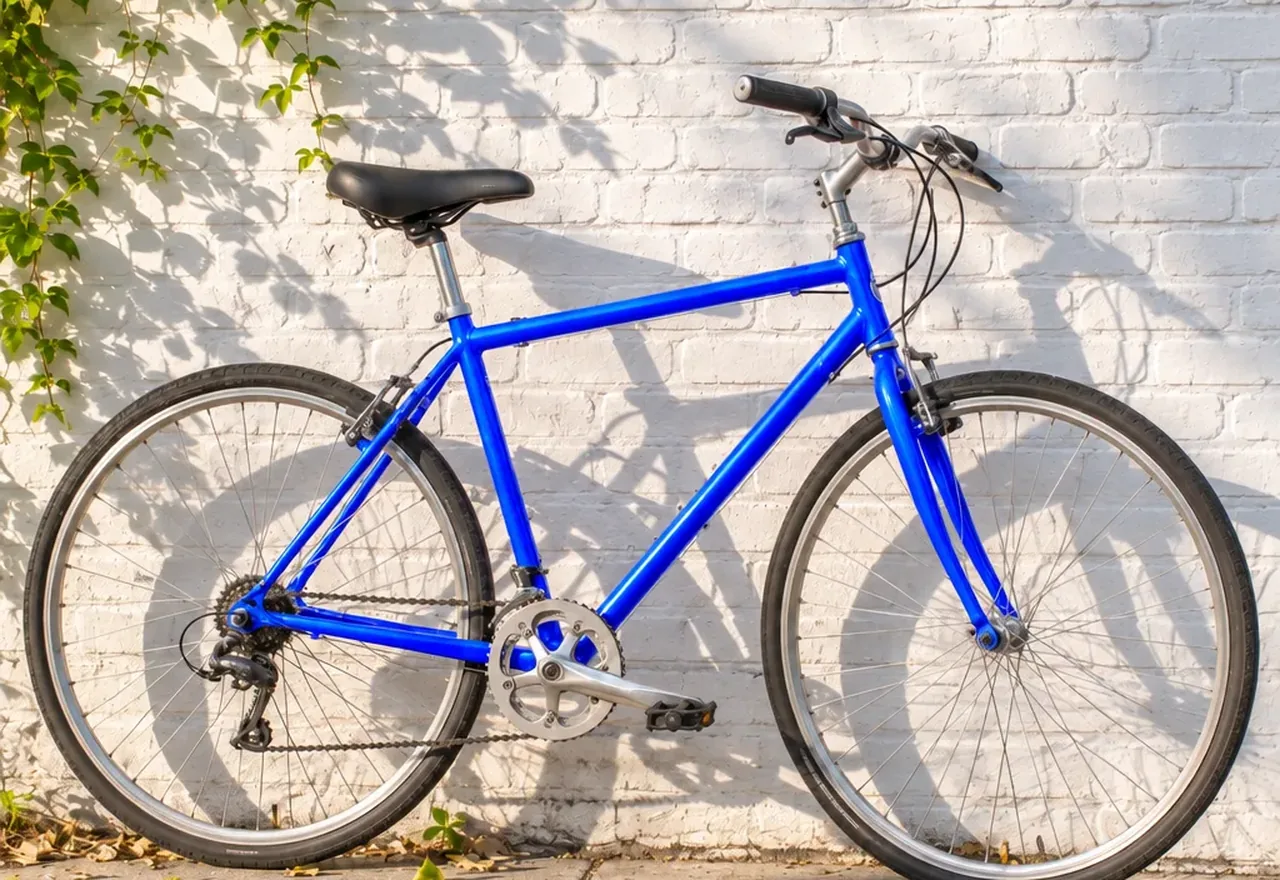
Our test · Flare

Text-to-image at five quality levels

One prompt gives an image from 1K to 4K, in 15 ratios or exact pixels. quality is low, medium, high, xhigh or max (or auto): higher means more detail and more tokens.

At 1K: low about $0.020, medium $0.035, high $0.042, max $0.169. Try the composition at low first.

Prompt (as sent)

A red bicycle leaning against a white brick wall, morning light, photo
Product visual

OpenAI launch example

Posters and product visuals

OpenAI says Flare improves layout quality for posters, product imagery and other professional visuals.

For layouts with many elements, try complexity medium or high.

From an early-access customer on OpenAI's launch page; the prompt and which 2.6 model made it are not published.

Photo + overlay
Flare output

OpenAI example

Markup-guided edits

Circle or point at something on a transparent overlay and say what to change; the model follows the marks.

Use a transparent PNG the same size as the first image, separate from it. It cannot be combined with mask.

Prompt (as sent)

Recolor the striped vase inside the red circle to solid cobalt blue ceramic. Keep its shape, the dried stems, and the rest of the kitchen unchanged. Remove the red circle from the finished photo.

low
medium
high

OpenAI example · Sunburst · medium quality

complexity: how much it plans

quality sets visual detail; complexity sets how much the model plans first. OpenAI recommends low for most edits and medium or high for scenes with many elements or constraints. No separate fee.

Omitted means high, so send low for edits. Higher can be slower and change more than you asked.

OpenAI has not published the prompt of these images.

512×512 · 9 frames · low

Our test · Flare

Animated GIF

Generate looping GIFs from text: 2–16 frames, 20–2000 ms per frame. 512×512 frames work at every frame count, 768×768 up to 12 frames. Reference images and transparent backgrounds are not available.

Our tests at 512×512, 9 frames, low: 10–14 seconds, 1,172 output tokens, about $0.031 at this page's rates. All frames are drawn on one sheet and billed as a whole; 2 to 8 frames use the same sheet size.

Prompt (as sent)

A small round orange robot mascot waving hello on a plain white background, seamless loop, friendly flat 3D style

Image work that suits GPT Image 2.6 Flare

Product images

Batches of the same product in different scenes.

1K · medium4:3 / 1:1

Social images and covers

Generate at the platform's shape, with no cropping afterwards.

1K · medium9:16 / 16:9

Image features in your product

Give your users text-to-image and edits, with the cost per image under control.

1K · low / mediumasync

Fast design drafts

Draft directions quickly, then refine with Sunburst or a designer.

1K · lowcomplexity low

GPT Image 2.6 Flare specs

Every field of the gpt-image-2.6-flare request body. Defaults are the API's.

modelstring

Always gpt-image-2.6-flare.

Default: required

promptstring

What to draw or change, up to 32,000 characters.

Default: required

sizestring

15 ratios (1:1, 3:2, 16:9, 21:9, 3:1 and more), exact WxH (multiples of 16, each edge up to 3840; OpenAI marks sizes above 2560×1440 as experimental) or auto. On an edit, omitting it follows the first image.

Default: 1:1

resolutionenum

Tier for a ratio: 1k, 2k or 4k. Not used with exact pixels.

Default: 1k

qualityenum

low, medium, high, xhigh, max or auto. Billed by tokens, so higher costs more.

Default: auto

imagesarray

1–16 HTTPS reference images, only on /v1/images/edits.

Default: omit

maskstring

Inpainting mask: a PNG with alpha, the size of the first image; transparent areas change. Not with markup.

Default: omit

markupstring

Transparent PNG with your marks, the size of the first image. Not with mask.

Default: omit

complexityenum

Planning level: low, medium or high. No separate fee.

Default: high

backgroundenum

transparent, opaque or auto. Transparent needs png or webp.

Default: auto

output_formatenum

png, jpeg, webp or gif. gif (animation) is text-to-image only.

Default: png

frame_countinteger

GIF only: 2–16 frames, all drawn on one sheet and billed as one image.

Default: 9

frame_duration_msinteger

GIF only: 20–2000 ms per frame, rounded to 10 ms.

Default: 200

output_compressioninteger

0–100, jpeg and webp only.

Default: omit

moderationenum

The website playground uses auto.

Default: auto

ninteger

One image per request.

Default: 1

asyncboolean

true returns a task id at once; poll GET /v1/tasks/{id}.

Default: false

response_formatenum

url or b64_json.

Default: url

callback_urlstring

An HTTPS URL notified when the task finishes; without it, poll the task.

Default: omit

How to use GPT Image 2.6 Flare

Test the composition at 1K low, then raise the quality.

01

Describe subject, scene and style

Say what to draw in a sentence; put any text in quotes.

02

Choose size, quality and shape

Check at 1K low, then medium; pick 2K or 4K for large images.

03

Verify, then call the API

Copy the same settings and call /v1/images/generations with your API key.

GPT Image 2.6 API quickstart

Two ways in, one API key and one balance: call the API from your own code, or let Claude Code or Codex call it for you through the APIKO MCP.

Option 1 · Call the API from your code

For: product backends, batch jobs, automation

1

Authenticate

Create an API key in the console, keep it in the APIKO_API_KEY environment variable and send Authorization: Bearer <key> with every request.

2

Submit a gpt-image-2.6-flare task

Send the model ID, the prompt and async: true to POST /v1/images/generations; you get a task id at once.

3

Get the result

Poll GET /v1/tasks/{id} until the status is completed, then read data[0].url. Result links expire after 24 hours, so download them in time.

Read the full API docs
POST /v1/images/generations
TASK_ID=$(curl https://api.apiko.app/v1/images/generations \
  -H "Authorization: Bearer $APIKO_API_KEY" \
  -H "Content-Type: application/json" \
  -d '{
  "model": "gpt-image-2.6-flare",
  "prompt": "A red bicycle leaning against a white brick wall, morning light, photo",
  "size": "1:1",
  "resolution": "1k",
  "moderation": "auto",
  "async": true
}' | python3 -c 'import json,sys; print(json.load(sys.stdin)["id"])')

while :; do
  TASK=$(curl -s https://api.apiko.app/v1/tasks/$TASK_ID \
    -H "Authorization: Bearer $APIKO_API_KEY")
  printf '%s\n' "$TASK"
  printf '%s' "$TASK" | grep -qE '"status": *"(completed|failed)"|"error": *\{' && break
  sleep 5
done

Option 2 · Call it from Claude Code or Codex

For: quick clips, prompt tests, letting an agent write the integration

1

Install the APIKO MCP

Keep the key in an environment variable, never in the chat.

2

Tell the agent what you want

The picture, shape, size and quality, plus a budget limit.

3

The agent quotes, submits and follows up

estimate_cost gives the price, then generate_image submits and hands you the image link.

# Claude Code

claude mcp add apiko --scope user -e APIKO_API_KEY=sk-... -- npx -y apiko-mcp

# Codex

codex mcp add apiko --env APIKO_API_KEY=sk-... -- npx -y apiko-mcp

Agent prompt

Use APIKO's gpt-image-2.6-flare to generate one image: 1K, medium, 1:1. Prompt: <describe the picture here>. Get a quote with estimate_cost first and ask me if it is over $1; once confirmed, submit with generate_image and send me the image link. If it fails, tell me why.

MCP setup guide →

Generate your first image with the GPT Image 2.6 API

Write a prompt and pick the size and quality in the generator on this page, then send the same request through the APIKO API.

Get an API key

GPT Image 2.6 API FAQ

How much does the GPT Image 2.6 API cost per image?

It is billed per token: $4.00 text input, $6.40 image input and $24.00 output per 1M tokens, 20% below OpenAI. A 1K medium image is about $0.035, 1K low about $0.020, and 4K medium about $0.118 by OpenAI's calculator.

Can I use the GPT Image 2.6 API without an OpenAI account?

Yes. Create an APIKO account and an API key; no OpenAI account or organization verification is needed. Alipay is accepted.

How do I call GPT Image 2.6 in Python?

Use the official OpenAI SDK, set base_url to https://api.apiko.app/v1, set the model to gpt-image-2.6-flare and call images.generate.

What is the difference between GPT Image 2.6 and 2.5?

OpenAI's token prices are the same. OpenAI says Images 2.6 generates 50% faster, and 2.6 adds the complexity setting. Token use differs: about 4.2 times 2.5 at low and 3.3 times at medium (1,449 vs 439 at 1K medium), and the same at high and above.

Which model ID should I use, Flare or Sunburst?

They cost the same. OpenAI positions Flare for fast iteration; Sunburst brings higher quality and greater consistency across edits at medium or high quality. Start with Flare and switch if detail or edits fall short.

What sizes and aspect ratios does GPT Image 2.6 support?

1k, 2k and 4k tiers and 15 ratios from 3:1 to 1:3, or exact pixels in multiples of 16 with each edge up to 3840. OpenAI marks sizes above 2560×1440 as experimental.

Can it edit images?

Yes. Send 1–16 references to /v1/images/edits. Use mask to change one area or markup to edit by your marks; pick one of the two.

What do the quality levels change?

Output tokens at 1K: low 824, medium 1,449, high 1,756, xhigh 3,122, max 7,024. Low suits composition tests; medium and high are close in price; xhigh and max cost much more. Without quality the model chooses and you pay for what it used.

How long does one image take?

OpenAI says Flare at low quality can take as little as six seconds. In our tests 1K medium took about 10 seconds directly and 1K low about 11 seconds through the gateway. Complex prompts can take up to 2 minutes; use async for those.

Can GPT Image 2.6 output SVG?

Not right now. SVG output is paused: output_format svg returns 400 and nothing is charged. We will update this answer when it comes back.

Is there a free trial for the GPT Image 2.6 Flare API?

Yes. Sign in with a Gmail account through Google and $0.20 of trial credit arrives automatically, no card needed, once per person. It works on gpt-image-2.6-flare: at about $0.035 for a 1K medium image it buys about 5 images.

Page updated